Analyze Semgrep Code findings with Semgrep Assistant
Once you've enabled Assistant, you can use the Analyze button on the Findings page to trigger all Assistant functions for Semgrep Code, including autofix, auto-triage, and component tagging, on existing findings.
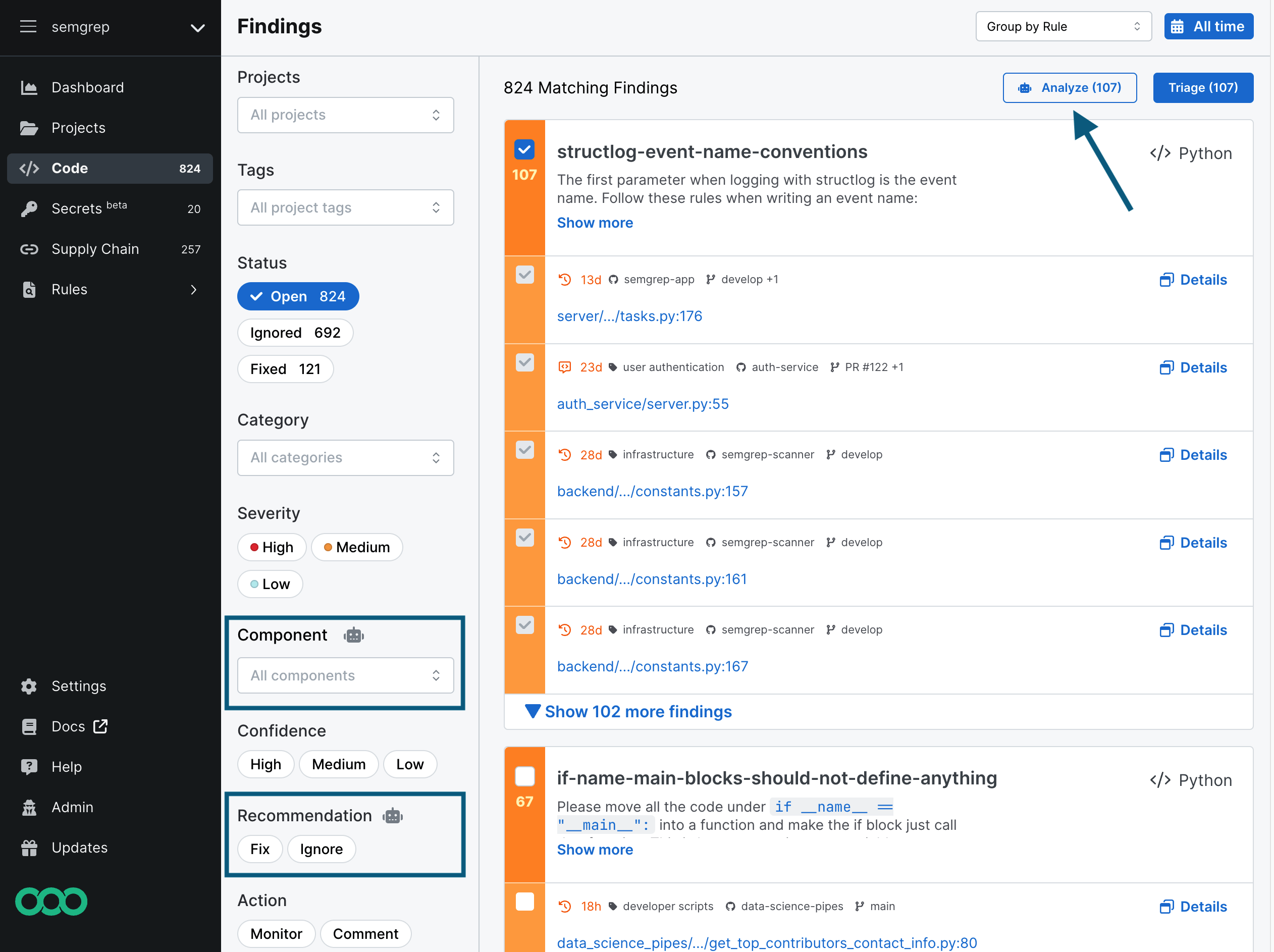
Analyze your findings with Assistant
- On the Findings page, select the findings that you want Assistant to analyze.
- Click Analyze.
- In the confirmation dialog that appears, confirm that you want to analyze your findings with Assistant.
After Assistant performs these functions, you can see its results on the Code page using the Recommendation or Component filters. When viewing your findings, you can see false positive and true positive recommendations in a finding's Details page.
The amount of time required to analyze your findings varies. Before running the analysis, the confirmation dialog provides an estimated wait time.
- For Team tier users with less than 10 contributors: There is a cap of 50 Assistant runs per month using the Analyze button.
- For Team or Enterprise users with an active subscription: There is a cap of 10,000 Assistant runs per month using the Analyze button. It is rate-limited to 1,000 Assistant runs per hour.
- For users of any tier: Assistant runs against pull requests (PRs) and merge requests (MRs) do not count against this limit.
When Assistant auto-analyzes findings
Assistant automatically analyzes new findings from a full scan that are Critical or High severity AND have High or Medium confidence.
On a diff-aware scan, Assistant analyzes up to 10 new findings, regardless of severity or confidence.
Findings that are not auto-analyzed
Assistant doesn't automatically analyze:
- Historical findings: Findings that were created before automatic analysis was enabled for your deployment. Automatic analysis for full scans was enabled in November 2025.
- Additional PR or MR findings: The eleventh finding or later on the same PR or MR. Only the first 10 are automatically analyzed.
Request analysis for existing findings
If you want Assistant analyses for findings that weren't automatically analyzed (as described above), you can request them in bulk through Semgrep AppSec Platform.
If you need assistance with bulk analysis requests or have questions about backfilling analyses for your findings, contact Semgrep Support.
View Assistant recommendations
You can view all of Semgrep Assistant's recommendations by going to the Semgrep Findings page and filtering by Recommendation or Component.
Provide feedback on Assistant recommendations
Semgrep Assistant prompts you for feedback whenever it suggests that a finding is a false positive. Because Assistant content is generated by large language models (LLMs), your feedback helps the Semgrep team improve Assistant.
Semgrep Assistant lets you leave feedback in the following places:
- In Semgrep AppSec Platform: the Assistant recommendation appears in Semgrep Code's Finding Details page under Activity, along with Agree and ignore or Disagree buttons.
- In Slack notifications: the Agree and Disagree buttons appear under the Assistant recommendation message.
If Semgrep Assistant suggests that a finding is a true positive and supplies an autofix suggestion, there is no automated mechanism to leave feedback on this outcome. Feel free to contact Semgrep Support to let us know your thoughts.
Not finding what you need in this doc? Ask questions in our Community Slack group, or see Support for other ways to get help.